> ## Documentation Index
> Fetch the complete documentation index at: https://docs.qall.io/llms.txt
> Use this file to discover all available pages before exploring further.
# Assistants
> What a caller talks to.
An assistant is one configured voice agent. It holds the prompt, the voice, the
models, and the lists of tools, knowledge and playbooks it may use.
One assistant can answer a phone number, run on your website, and make outbound
calls at the same time.
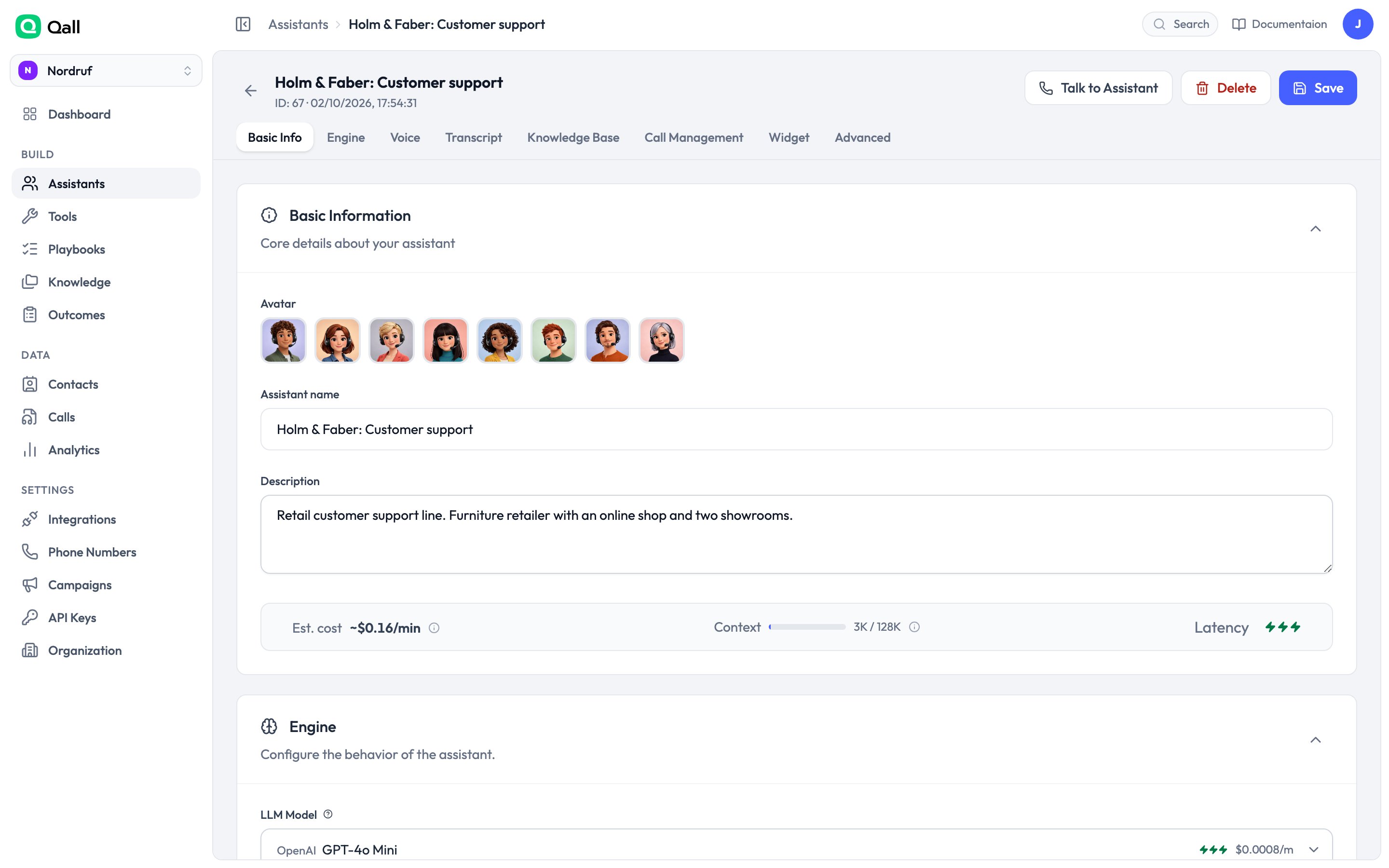 ## Name and avatar
Give the assistant a name you'll recognise in the calls list — if you run several
lines, name them after the line rather than the persona. Pick an avatar to tell
them apart at a glance.
## Prompt
The system prompt is the assistant's instructions. Keep it specific about what it
should do and how it should sound.
You can use [variables](/variables) anywhere in it, so the prompt knows
the time, the caller, and anything your systems told it:
```text theme={null}
You are the reservations line for {{org.name}}.
The caller is {{contact.first_name | "a new guest"}}.
```
**First message** is what the assistant says when the call connects. Leave it
empty and the assistant waits for the caller to speak first.
New to this? [Writing prompts for voice calls](/guides/writing-prompts) covers
how to structure one so it works on the phone.
## Voice and models
| | Options | Default |
| - | - | - |
| **Language model** | OpenAI, Anthropic, Azure OpenAI | OpenAI `gpt-4o-mini` |
| **Speech to text** | Deepgram, Soniox, OpenAI | Deepgram `nova-3` |
| **Voice** | ElevenLabs, Cartesia, Soniox | ElevenLabs |
Browse voices and hear them before choosing. For multilingual calls, Soniox
handles language switching mid-conversation; set language hints for the languages
you expect.
You can also set a **fallback model**, so a call continues on a second provider if
the first one fails.
### What it will cost
As you change models, the editor shows an estimated **cost per minute**, broken
down by the language model, the voice and the transcription. Swap a model and the
figure moves before you save anything.
Anything running on [your own provider key](/integrations) shows as **BYOK** and
isn't billed by Qall.
The language model is usually the biggest line and the easiest to over-spend on.
Try the cheapest one that holds the conversation before reaching for a larger
one — on a phone call, latency often matters more than reasoning.
### Voice settings
Pick a voice from the list, or paste a voice id from your provider for a cloned
or custom voice.
ElevenLabs voices add three more controls:
| | What it does |
| - | - |
| **Stability** | Lower is more expressive and more variable; higher is flatter and more predictable. |
| **Similarity** | How closely to stick to the original voice. |
| **Style** | How much the voice performs. Adds latency as you raise it. |
For phone calls, moderate stability and low style usually sound most natural —
heavy styling reads as theatrical down a phone line, and costs time on every
turn.
### Speech-to-text settings
| Setting | What it does |
| - | - |
| **Language** | The language you expect callers to speak. |
| **Language hints** | For multilingual lines: the languages to expect, so switching mid-call is recognised. Soniox. |
| **Keywords and keyterms** | Words to bias recognition towards — product names, place names, anything unusual. One per line. Deepgram. |
| **Endpoint sensitivity** | Low, Balanced or High. How eagerly the provider decides a caller has stopped. Soniox. |
Keyterms are worth the five minutes. If your callers say a brand name the
transcriber keeps mangling, adding it here fixes it more reliably than anything
in the prompt.
## Conversation behaviour
These control how the assistant handles the back-and-forth. The defaults work for
most phone calls — change them if callers tell you something feels off.
| Setting | What it does | Default |
| - | - | - |
| **Interruptions** | Whether a caller can cut the assistant off. | On |
| **Interrupt the greeting** | Whether they can cut off the opening line specifically. | On |
| **Minimum words to interrupt** | Ignores "mm-hm", coughs and background noise. | 1 word |
| **Resume after a false interruption** | Picks the sentence back up when the caller didn't really want the floor. | On |
### Turn-taking
The assistant decides when you've finished speaking rather than waiting for a
fixed silence. It commits after **0.3 seconds** at the earliest and **2.5 seconds**
at the latest.
Lower the minimum for a snappier feel; raise the maximum if your callers pause
mid-sentence to think.
Two detectors are offered. **Audio model** is the one to use — it listens to how
you're speaking and decides from that. **Text model** is kept for older setups; it
waits for the transcript before deciding, which adds a noticeable pause on
providers that only transcribe once you've stopped.
## When the caller goes quiet
Set **idle timeout** to the number of seconds of silence after which the assistant
checks in. It asks up to **three times**, then says goodbye and hangs up.
Leave **idle message** empty and the assistant writes its own check-in, in whatever
language it has been speaking. Fill it in only if you need exact words — what you
write is what's said, in the language you wrote it.
## Recording
For the consent gate in full — keypad answers, per-language wording, and what
happens when a caller declines — see
[Recording and consent](/guides/recording-and-consent).
Recording is on by default. Each call produces one audio file of both sides, as
MP3 or OGG.
Turn on **ask for consent** and the assistant asks before recording starts. The
caller can answer out loud or press **1** to agree and **2** to decline. Either
way the call continues — declining only means it isn't recorded.
## What the assistant can use
Attach [tools](/tools), [knowledge](/knowledge) and
[playbooks](/playbooks) from the assistant's own page.
[Outcomes](/outcomes) work the other way round: an outcome lists the
assistants it applies to, so you assign those from the Outcomes page.
This documentation is built and hosted on [Mintlify](https://mintlify.com), a developer documentation platform.
## Name and avatar
Give the assistant a name you'll recognise in the calls list — if you run several
lines, name them after the line rather than the persona. Pick an avatar to tell
them apart at a glance.
## Prompt
The system prompt is the assistant's instructions. Keep it specific about what it
should do and how it should sound.
You can use [variables](/variables) anywhere in it, so the prompt knows
the time, the caller, and anything your systems told it:
```text theme={null}
You are the reservations line for {{org.name}}.
The caller is {{contact.first_name | "a new guest"}}.
```
**First message** is what the assistant says when the call connects. Leave it
empty and the assistant waits for the caller to speak first.
New to this? [Writing prompts for voice calls](/guides/writing-prompts) covers
how to structure one so it works on the phone.
## Voice and models
| | Options | Default |
| - | - | - |
| **Language model** | OpenAI, Anthropic, Azure OpenAI | OpenAI `gpt-4o-mini` |
| **Speech to text** | Deepgram, Soniox, OpenAI | Deepgram `nova-3` |
| **Voice** | ElevenLabs, Cartesia, Soniox | ElevenLabs |
Browse voices and hear them before choosing. For multilingual calls, Soniox
handles language switching mid-conversation; set language hints for the languages
you expect.
You can also set a **fallback model**, so a call continues on a second provider if
the first one fails.
### What it will cost
As you change models, the editor shows an estimated **cost per minute**, broken
down by the language model, the voice and the transcription. Swap a model and the
figure moves before you save anything.
Anything running on [your own provider key](/integrations) shows as **BYOK** and
isn't billed by Qall.
The language model is usually the biggest line and the easiest to over-spend on.
Try the cheapest one that holds the conversation before reaching for a larger
one — on a phone call, latency often matters more than reasoning.
### Voice settings
Pick a voice from the list, or paste a voice id from your provider for a cloned
or custom voice.
ElevenLabs voices add three more controls:
| | What it does |
| - | - |
| **Stability** | Lower is more expressive and more variable; higher is flatter and more predictable. |
| **Similarity** | How closely to stick to the original voice. |
| **Style** | How much the voice performs. Adds latency as you raise it. |
For phone calls, moderate stability and low style usually sound most natural —
heavy styling reads as theatrical down a phone line, and costs time on every
turn.
### Speech-to-text settings
| Setting | What it does |
| - | - |
| **Language** | The language you expect callers to speak. |
| **Language hints** | For multilingual lines: the languages to expect, so switching mid-call is recognised. Soniox. |
| **Keywords and keyterms** | Words to bias recognition towards — product names, place names, anything unusual. One per line. Deepgram. |
| **Endpoint sensitivity** | Low, Balanced or High. How eagerly the provider decides a caller has stopped. Soniox. |
Keyterms are worth the five minutes. If your callers say a brand name the
transcriber keeps mangling, adding it here fixes it more reliably than anything
in the prompt.
## Conversation behaviour
These control how the assistant handles the back-and-forth. The defaults work for
most phone calls — change them if callers tell you something feels off.
| Setting | What it does | Default |
| - | - | - |
| **Interruptions** | Whether a caller can cut the assistant off. | On |
| **Interrupt the greeting** | Whether they can cut off the opening line specifically. | On |
| **Minimum words to interrupt** | Ignores "mm-hm", coughs and background noise. | 1 word |
| **Resume after a false interruption** | Picks the sentence back up when the caller didn't really want the floor. | On |
### Turn-taking
The assistant decides when you've finished speaking rather than waiting for a
fixed silence. It commits after **0.3 seconds** at the earliest and **2.5 seconds**
at the latest.
Lower the minimum for a snappier feel; raise the maximum if your callers pause
mid-sentence to think.
Two detectors are offered. **Audio model** is the one to use — it listens to how
you're speaking and decides from that. **Text model** is kept for older setups; it
waits for the transcript before deciding, which adds a noticeable pause on
providers that only transcribe once you've stopped.
## When the caller goes quiet
Set **idle timeout** to the number of seconds of silence after which the assistant
checks in. It asks up to **three times**, then says goodbye and hangs up.
Leave **idle message** empty and the assistant writes its own check-in, in whatever
language it has been speaking. Fill it in only if you need exact words — what you
write is what's said, in the language you wrote it.
## Recording
For the consent gate in full — keypad answers, per-language wording, and what
happens when a caller declines — see
[Recording and consent](/guides/recording-and-consent).
Recording is on by default. Each call produces one audio file of both sides, as
MP3 or OGG.
Turn on **ask for consent** and the assistant asks before recording starts. The
caller can answer out loud or press **1** to agree and **2** to decline. Either
way the call continues — declining only means it isn't recorded.
## What the assistant can use
Attach [tools](/tools), [knowledge](/knowledge) and
[playbooks](/playbooks) from the assistant's own page.
[Outcomes](/outcomes) work the other way round: an outcome lists the
assistants it applies to, so you assign those from the Outcomes page.
This documentation is built and hosted on [Mintlify](https://mintlify.com), a developer documentation platform.